
AI Handwriting to Text: Because Your Penmanship is a Crime
Your Handwriting Shouldn’t Stand Between You and Productivity
AI handwriting to text tools have gotten remarkably good — and fast. In 2026, the technology has reached a point where even the most challenging scripts can be converted into digital text with high precision, offering solutions for students, researchers, and businesses alike.
Let’s be honest. Your lecture notes look like a seismograph reading during an earthquake. Your to-do lists are a cryptic puzzle only past-you understood. And that research journal? Even you can’t decode it three days later.
You’re not alone. Paper fades, gets lost, and is nearly impossible to search or organize at scale.
The good news: AI handwriting recognition has crossed a major threshold. We’re no longer talking about the clunky OCR tools that failed on anything but perfectly typed fonts. Modern AI tools are trained on millions of handwriting samples and can now handle cursive, scrawls, coffee-stained notebooks, and even 200-year-old manuscripts.
One Reddit user described trying to process hundreds of handwritten surveys with wildly different handwriting styles — different people, different pens, different levels of legibility. Tools that would have completely failed five years ago now handle this kind of messy, real-world input with surprising accuracy.
The catch? Not every tool is built the same. Some excel at historical scripts. Others are optimized for mobile note-taking or bulk business processing. Picking the wrong one wastes time and money.
This guide breaks down the top AI handwriting to text tools side by side — so you can pick the right one for your actual workflow.
The Evolution of AI Handwriting to Text vs. Traditional OCR
To understand why ai handwriting to text is so effective in 2026, we have to look at how far we have come from “Old School” OCR. Traditional Optical Character Recognition was essentially a glorified game of “match the shape.” It looked at a pixelated letter ‘A’ and compared it to a library of known fonts. If you used Times New Roman, it was a genius. If you used a ballpoint pen and a bit of a slant, it was useless.
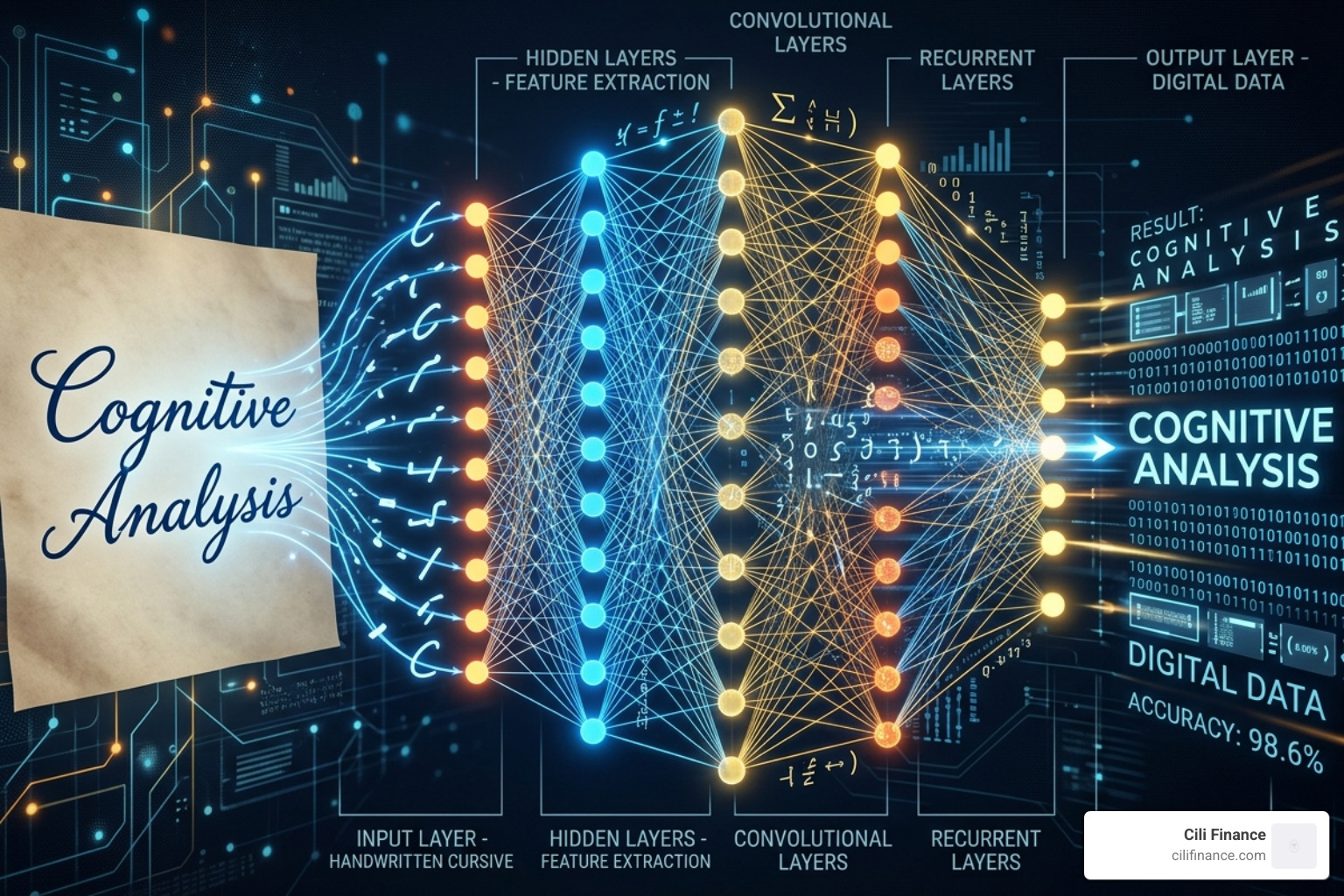
Modern Handwriting Text Recognition (HTR) uses deep learning and neural networks. Instead of just looking at shapes, these systems analyze the context. They look at the letters before and after a stroke to guess the word, much like a human does when reading a doctor’s prescription.
Deep Learning and Neural Networks
Today’s AI doesn’t just see pixels; it understands layers. It uses neural networks that have been fed hundreds of millions of pages of human writing. This allows for character-level recognition even in connected cursive where one letter flows into the next.
Layout Analysis and Language Modeling
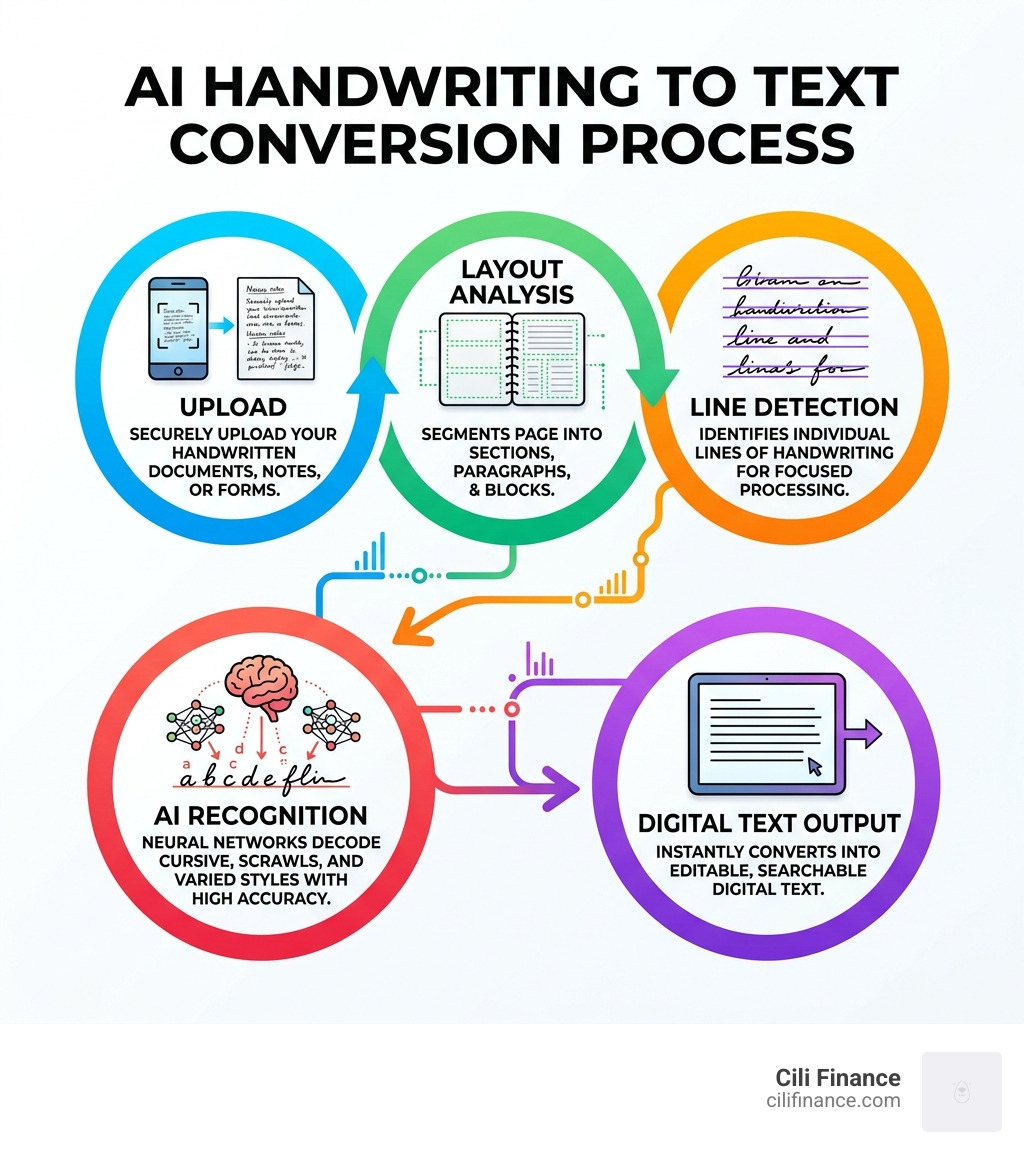
One of the biggest hurdles in the past was layout. If you wrote a note in the margin or used a table, old OCR would get confused and turn the document into “word soup.” Modern AI performs sophisticated layout analysis to detect lines, columns, and even slanted text. By applying language models, the AI can distinguish between a messy “0” and a messy “O” based on whether it’s in the middle of a word or a phone number.
Top Platforms for Converting Scrawls into Structured Data
Choosing a platform depends entirely on your “volume” and “messiness.” If you are a student digitizing one page of notes, you need an app. If you are a business processing 5,000 surveys, you need an API.
Leading Cloud AI Services and Enterprise Solutions
For those who need heavy lifting, professional-grade cloud services are a standout. These platforms achieve over 95% accuracy on handwriting that would make most people cross-eyed. They are particularly popular for business operations like processing timesheets or invoices because they offer word error rates of less than 1%.
Another option for developers is using major cloud vision APIs. These offer generous free tiers and scale affordably for high-volume processing, making them a favorite for building custom applications.
Online AI Transcription and Organization
For the everyday user, integrated AI transcription in popular note-taking apps has become a staple. These tools don’t just transcribe; they integrate the text into a searchable database. This is perfect for someone who has a “shoebox full of recipes” or years of journals they want to finally make searchable.
When evaluating a tool, consider these key features:
- Primary Format: Whether you need a web interface, a mobile app, or a developer API.
- Specialization: Some tools excel at messy cursive, while others are optimized for historical manuscripts or real-time note-taking.
- Language Support: Many modern engines support hundreds of languages and scripts.
- Confidence Scores: Professional tools provide feedback on how certain they are about each word.
Specialized AI Handwriting to Text for Historical Manuscripts
If you are dealing with 18th-century church records or ancestral diaries, specialized platforms are available. These systems have processed hundreds of millions of pages and are trusted by researchers worldwide.
- Historical Models: Specialized AI models are trained on more than 30 million words from historical documents.
- Script Support: They can read scripts like Kurrent, Sütterlin, and Fraktur—scripts that most modern humans can’t even identify.
- Custom Training: For massive projects, you can even train a custom model on a specific person’s handwriting to reach near-perfect accuracy.
Mobile Apps for Real-Time AI Handwriting to Text Conversion
For those who prefer the feel of a stylus on a screen, top-tier mobile apps are the gold standard. They offer an “infinite canvas” where you can brainstorm, write math equations that automatically solve, and export everything to professional document formats.
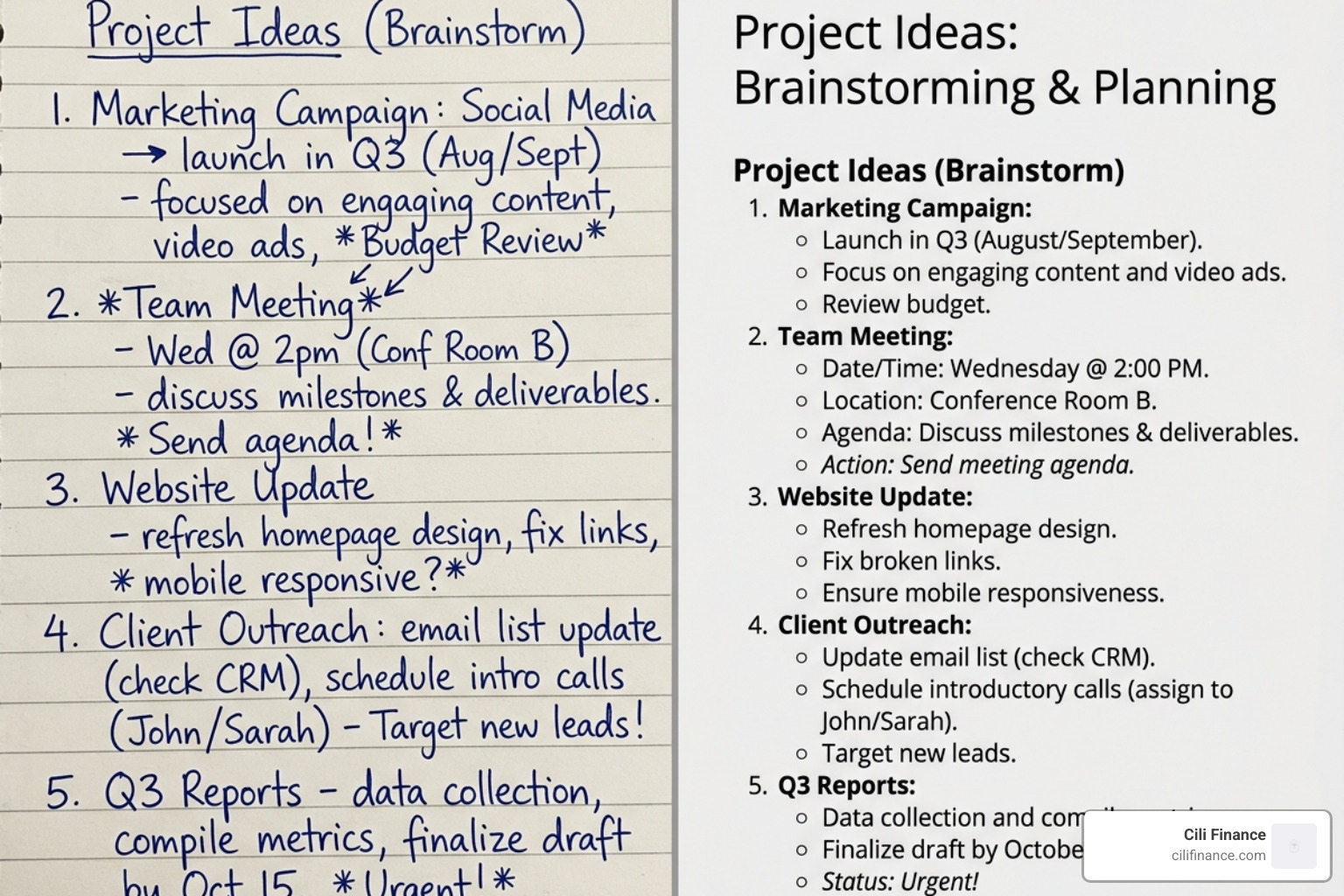
Other mobile favorites are specifically designed to handle “cursive scrawl” and can even reconstruct complex layouts like tables and forms directly from a smartphone photo.
Accuracy Benchmarks for Cursive and Messy Penmanship
The question everyone asks is: “Can it read my writing?”
In 2026, the answer is almost certainly yes. High-end AI engines report a 98.2% word accuracy rate. Even on “messy” documents, top-tier ai handwriting to text engines maintain word error rates below 1%.
Factors That Influence Accuracy
While the AI is powerful, it isn’t magic. Your results will improve drastically if you follow a few simple rules:
- High-Resolution Scanning: Use a dedicated scanner or a high-quality phone camera. Blurry images lead to blurry results.
- Lighting: Avoid shadows. Even lighting helps the AI distinguish between a pen stroke and a fold in the paper.
- Image Preprocessing: Some tools allow you to adjust contrast or brightness before processing. This can help “pop” the ink against the background.
- Avoid Overlaps: If your writing loops so far down that it tangles with the line below, the AI might struggle with “line detection.”
Leading transcription tools often emphasize that while they can handle a lot, a clear image is the difference between a 90% and a 99% success rate.
Security, Privacy, and Enterprise API Integration
When you’re digitizing sensitive business documents or personal diaries, privacy is paramount. Most professional ai handwriting to text services now offer bank-grade encryption for data in transit and at rest.
Data Ownership and Compliance
Professional platforms emphasize secure hosting and compliance with data protection regulations, ensuring that you retain full ownership of your data. Many services have strict policies where they do not use your uploaded documents to train their AI models, protecting your intellectual property.
Automating with REST APIs
For businesses, the real power lies in automation. By using a REST API, a company can automatically feed scanned PDFs into an AI engine and receive structured JSON data back. This data includes “confidence scores”—the AI’s way of saying, “I’m 99% sure this is the word ‘Invoice,’ but only 70% sure about this signature.” This allows humans to only step in and check the “low confidence” items, saving thousands of hours of manual labor.
At CiliFinance, we understand that managing data efficiently is the backbone of modern productivity. Whether you’re a researcher or a business owner, moving from paper to digital is a critical step in staying organized. You can learn more about us and how we view the future of digital workflows.
Frequently Asked Questions about Handwriting Recognition
Can AI read messy or illegible handwriting?
Yes! Modern neural networks are designed for pattern recognition and contextual analysis. While traditional OCR might see a random squiggle, ai handwriting to text tools look at the surrounding words to deduce the meaning. Most high-quality tools maintain about 95% accuracy even on challenging cursive. However, extreme “doctor-level” illegibility or damaged paper (coffee stains, tears) can still lower that percentage.
Are there free AI tools for handwriting conversion?
Absolutely. Most major providers offer a “freemium” model. Some give a set number of free credits every month, while others offer a generous page limit for the first month or a trial period to test accuracy before you commit to a subscription.
Which file formats are supported for AI transcription?
Most tools are very flexible. Common supported formats include:
- Images: JPG, PNG, GIF, BMP, WebP, and TIFF.
- Mobile Formats: HEIC and HEIF (standard on iPhones).
- Documents: PDF (though some tools prefer you convert PDFs to high-res JPGs first for better results). Most enterprise tools have a file size limit of around 100MB per image, which is more than enough for a high-resolution scan.
Conclusion
The era of manual data entry is officially over. Whether you’re trying to preserve a family legacy of recipes, grade a stack of student assignments, or digitize a century of archival records, ai handwriting to text technology is ready for the task.
By choosing the right tool—whether it’s a historical precision engine, a mobile-first app, or an organizational powerhouse—you can turn your “criminal” penmanship into a clean, searchable, and useful digital asset.
At CiliFinance, we’re passionate about tools that boost productivity and simplify your life. Don’t let your notes stay trapped on paper; the future is digital, searchable, and incredibly accurate.
Ready to start your paperless journey? Check out our homepage for more insights on modern digital solutions and contact us at CiliFinance Contact if you have questions about integrating these technologies into your workflow.
